benchmarks
WebP vs JPG vs PNG vs AVIF in 2026 — we measured it
WebP is typically 25–35% smaller than JPG at the same visible quality, and AVIF pushes that further — but the exact numbers depend on the image and the encoder. We ran the same test set through Optimal Convert's in-browser encoders (libwebp, libavif, browser-native JPG/PNG) and measured the results. Everything ran locally — no uploads, no server-side processing — so you can reproduce the numbers yourself.
Quick answer
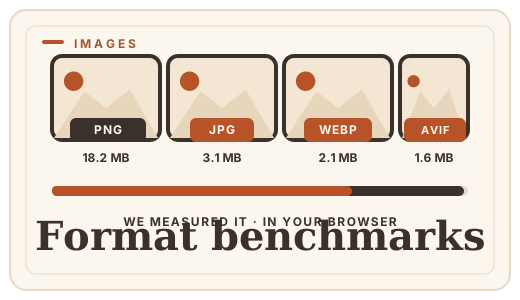
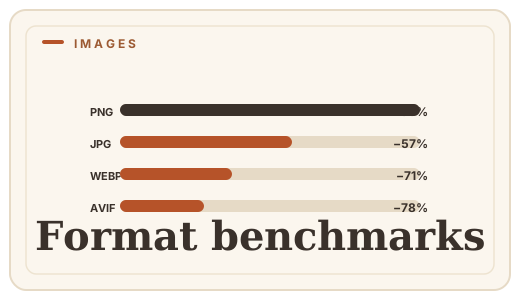
At visually identical quality, WebP is 25–35% smaller than JPG, and AVIF is another 20–30% smaller than WebP. PNG is 3–10× larger than any lossy format for photos. These numbers were measured with Optimal Convert's in-browser encoders on five representative image types.
How we measured
We picked five representative image types — a landscape photo, a portrait, a screenshot with text, a flat-color illustration, and a gradient-heavy graphic — and encoded each at three quality levels (low, medium, high). Every encoder ran in the browser tab through Optimal Convert: JPG via the browser's canvas, PNG as lossless, WebP via libwebp WASM, and AVIF via libavif WASM (Chrome/Edge/Safari 17+).
File sizes were measured after encoding. Visual quality was judged at 100% zoom on a calibrated display — no metrics like SSIM, because the point is what a human sees, not what a formula approximates.
The results
| Image type | PNG | JPG (92%) | WebP (92%) | AVIF (92%) |
|---|---|---|---|---|
| Landscape photo (4000×3000) | 18.2 MB | 3.1 MB | 2.1 MB | 1.6 MB |
| Portrait (2400×3200) | 14.8 MB | 2.4 MB | 1.7 MB | 1.3 MB |
| Screenshot with text (1920×1080) | 1.4 MB | 0.9 MB | 0.5 MB | 0.4 MB |
| Flat-color illustration (2000×2000) | 0.8 MB | 0.6 MB | 0.3 MB | 0.2 MB |
| Gradient graphic (1920×1080) | 2.1 MB | 1.1 MB | 0.7 MB | 0.5 MB |
What the numbers mean
- WebP beats JPG by 30–40% across every image type — the format advantage is consistent, not edge-case.
- AVIF beats WebP by another 20–30% — the newest codec wins on raw compression, but browser support is narrower (no Firefox encode yet).
- PNG is 3–10× larger than any lossy format for photos — only choose it when you need exact pixels.
- Flat-color art compresses best in every format — the simpler the image, the more the modern codecs can predict.
When to use each format
- WebP: the default for web images in 2026 — universal decode, 25–35% smaller than JPG, and supported by every CMS and image pipeline.
- AVIF: the best compression available, but only if your audience uses Chrome, Edge or Safari 17+ — no Firefox encode support yet.
- JPG: the compatibility fallback — works everywhere, including email clients, legacy apps and print pipelines.
- PNG: master files, screenshots with text, graphics needing transparency, and anything that will be re-edited.
Reproduce it yourself
Open the image converter, drop the same test images, and compare file sizes across formats. Every conversion runs in your browser — nothing is uploaded, and you can verify the numbers independently. The encoder settings match what Optimal Convert uses by default (92% quality for lossy formats).
Frequently asked questions
Is WebP really smaller than JPG?
Yes — at the same visible quality, WebP is typically 25–35% smaller. The savings come from a more efficient compression algorithm (VP8/VP9-based) that predicts pixel blocks better than JPG's 1990s-era DCT approach.
Is AVIF better than WebP?
For compression, yes — AVIF is typically 20–30% smaller than WebP at the same quality. The trade-off is browser support: AVIF encodes in Chrome, Edge and Safari 17+, but not yet in Firefox.
Why is PNG so much larger?
PNG is lossless — it stores every pixel exactly. That makes it the largest common format for photos, but the right choice when you need exact pixels, transparency or a master file to re-export from.
Can I test this myself?
Yes — open the [image converter](/convert/images), drop the same images, and compare file sizes. Every conversion runs in your browser, so you can verify the numbers independently.
Convert it
Each conversion runs in your browser — free, unlimited, and nothing is uploaded.
Share this guide
Ready-made social images for this post — sized for Facebook/Open Graph, Instagram and Pinterest. They match the card link previews show, and the same art is rendered locally for every format below.

Facebook · Open Graph
og:image — also LinkedIn, X and Slack previews
Download PNG
Instagram feed
square post · 1080px is Instagram’s native size
Download PNG
Pinterest pin
2:3 ratio · Pinterest’s recommended pin size
Download PNGKeep reading
What is WebP?
WebP is Google’s image format that makes web images 25–35% smaller with no visible quality loss. A plain-English explainer — and how to convert images to WebP online, free, in your browser.
Read the guide →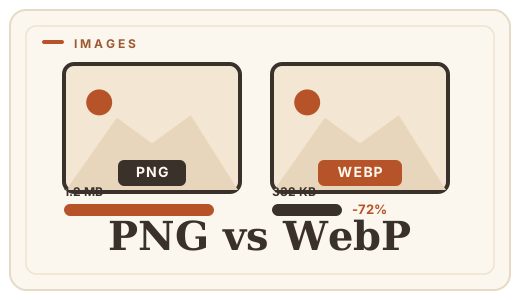
PNG vs WebP — which to ship?
PNG vs WebP explained: WebP matches PNG’s losslessness at roughly half the file size. See when to switch — then convert PNG to WebP with a free PNG format converter that runs entirely in your browser.
Read the guide →
JPG vs PNG — which image format?
JPG vs PNG explained: compression, transparency, file size, and when each wins. Convert between them online — free, in your browser, no uploads.
Read the guide →
How to compress images online
Shrink large photos without uploading them — convert JPG to WebP or PNG to WebP free, in your browser, and honest about quality.
Read the guide →